Croissant Format Specification
Version 1.1
Published: 2026-01-29
http://mlcommons.org/croissant/1.1
Editors:
- Omar Benjelloun (Google),
- Elena Simperl (King’s College London & Open Data Institute)
Authors:
- Omar Benjelloun (Google),
- Elena Simperl (King’s College London & Open Data Institute),
- Pierre Ruyssen (Google),
- Pierre Marcenac (Google),
- Costanza Conforti (Google),
- Michael Kuchnik (Meta),
- Joan Giner-Miguelez (Barcelona Supercomputing Center),
- Mubashara Akthar (ETH Zurich & ETH AI Center),
- Nitisha Jain (Independent),
- Joaquin Vanschoren (OpenML),
- Luis Oala (Dotphoton),
- Pascal Heus (CODATA)
Contributors (In Alphabetical Order):
- Brooke Byers (Iceberg Tech),
- Hande Celikkanat (Common Crawl Foundation),
- Philip Durbin (Harvard),
- Greg Lindahl (Common Crawl Foundation),
- Peter Mattson (ML Commons & Google),
- Rajat Shinde (NASA IMPACT & UAH),
- Goeff Thomas (Kaggle),
- Slava Tykhonov (CODATA),
- Jos Van Der Velde (OpenML),
- Susheel Varma (Sage Bionetworks),
- Steffen Vogler (Bayer),
- Ian Ward (CKAN)
Acknowledgements:
- The Croissant Working Group
Croissant © 2024-2026 by MLCommons Association and contributors is licensed under CC BY-ND 4.0


Note: The CC BY-ND license was selected to facilitate widespread adoption and use of the Croissant specification while maintaining a canonical reference version. However, this license can raise questions around what downstream uses are permissible. MLCommons wants to assure all prospective users that they are free to remix and adapt the Croissant specification for their internal use. If users want to distribute something they have created based on or that adds to the specification, they can as long as the Croissant specification is referenced through a link, (i.e., not incorporated directly) and the specification itself isn't changed. Just remember to include the attribution. Don’t hesitate to reach out if you have any questions.
Introduction
Datasets are the basis of machine learning (ML). However, a lack of standardization in the description and semantics of ML datasets has made it increasingly difficult for researchers and practitioners to explore, understand, and use all but a small fraction of popular datasets.
The Croissant metadata format simplifies how data is used by ML models. It provides a vocabulary for dataset attributes, streamlining how data is loaded across ML frameworks such as PyTorch, TensorFlow or JAX. In doing so, Croissant enables the interchange of datasets between ML frameworks and beyond, tackling a variety of discoverability, portability, reproducibility, and responsible AI (RAI) challenges, while enabling LLMs to help users tackle these challenges.
Discoverability
Once a dataset has Croissant metadata attached to it, dataset search engines can parse this metadata, allowing users to find and use the datasets they need no matter where these datasets have been published (Figure 1). LLMs and AI agents can also support discovery through RAG over an index of Croissant descriptions. For dataset creators, it means their data is discoverable no matter where it is made available online, as long as they use the format.
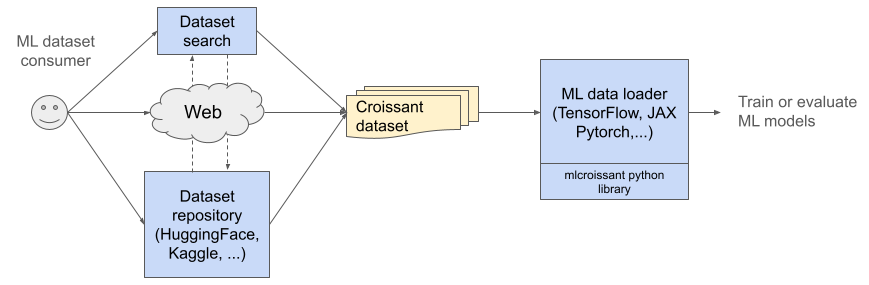
Figure 1: A user can search for datasets from a dataset repository or a dataset search engine. Upon finding a dataset that matches user goals, it can be seamlessly loaded into an ML data loader.
Portability and Reproducibility
Croissant provides sufficient information for an ML tool to load a dataset, allowing users to incorporate Croissant datasets in the training and evaluation of a model with just a few lines of code (Figure 2). Croissant can easily be added to any tools e.g., for data preprocessing, analysis and visualization, or labeling. Since the format is standardized, any Croissant-compliant tool will have an identical interpretation of the data. Furthermore, the information stored in a Croissant record attached to a dataset helps people (and AI agents) understand its content and context and compare it with other datasets. All this leads to increased portability and reproducibility in the entire ML ecosystem.
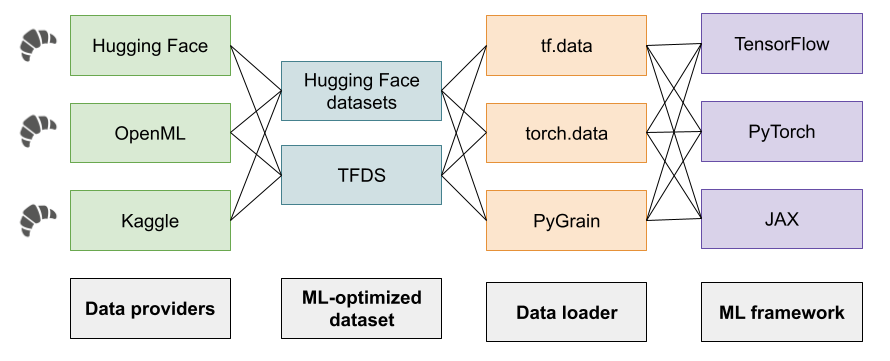
Figure 2: Croissant metadata helps load ML datasets into different ML frameworks
Creating or changing the metadata is straightforward. A dataset repository can infer it from existing documentation such as a data card; beyond that, editing Croissant dataset descriptions is also supported through a visual editor and a Python library (Figure 3).
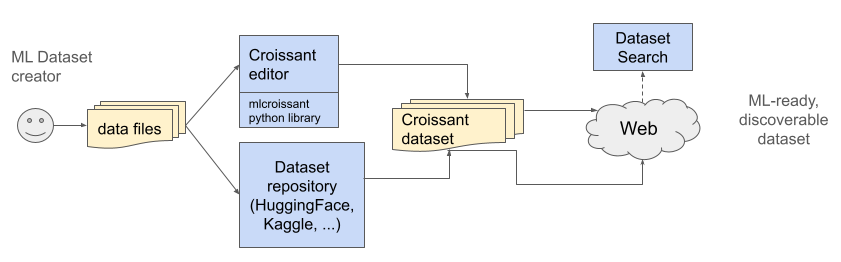
Figure 3: Croissant benefits dataset creators by providing a standardized representation to edit and catalog datasets, supported by an editor and Python library. Once a dataset is published with the associated metadata, it can be found by dataset search engines.
Responsible AI
As AI advances at a rapid speed, there is increased recognition among researchers, practitioners, and policy makers that we need to explore, understand, manage, and assess its economic, social, and environmental impacts. To address these challenges, Croissant offers machine-actionable mechanisms for the responsible use and sharing of data. This includes the representation of data provenance and usage conditions, as well as a vocabulary extensions for publishing Responsible AI (RAI) documentation, such as Data Cards. The mechanisms and the vocabulary are built upon W3C standards (PROV-O, ODRL) and incorporate existing RAI practices. Their goal is to facilitate the responsible sharing, discovery, and reuse of data while also assisting AI agents in evaluating datasets against RAI criteria during discovery.
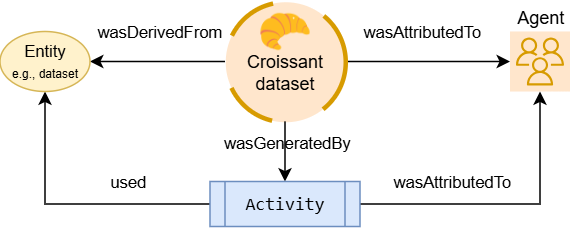
Figure 4: Croissant integrates existing W3C standards as PROV-O to capture machine-readable data provenance.
We welcome additional extensions from the community to meet the needs particular and responsible AI aspects of specific data modalities (e.g. audio or video) and domains (e.g. geospatial, life sciences, cultural heritage).
Terminology
Dataset: A collection of data points or items reflecting the results of such activities as measuring, reporting, collecting, analyzing, or observing.
Croissant dataset: A dataset that comes with a description in the Croissant format. Note that the Croissant description of a dataset does not generally contain the actual data of the dataset (with the exception of small examples or enumerations). The data itself is contained in separate files, referenced by the Croissant dataset description.
Data record: A granular part of a dataset, such as an image, text file, or a row in a table.
Recordset: A set of homogeneous data records, such as a collection of images, text files, or all the rows in a table.
Format Example
To understand the various pieces of a Croissant dataset description, let's look at an example, based on the PASS dataset.
Croissant metadata is encoded in JSON-LD.
{
  "@context": {
    "@language": "en",
    "@vocab": "http://schema.org/"
  },
  "@type": "sc:Dataset",
  "name": "simple-pass",
  "conformsTo": "http://mlcommons.org/croissant/1.1",
  "description": "PASS is a large-scale image dataset that does not include any humans ...",
  "citeAs": "@Article{asano21pass, author = \"Yuki M. Asano and Christian Rupprecht and ...",
  "license": "https://creativecommons.org/licenses/by/4.0/",
  "url": "https://www.robots.ox.ac.uk/~vgg/data/pass/",
The beginning of the Croissant description contains general information about the dataset such as name, short description, license and URL. Most of these attributes are from schema.org, with a few additions described in the Dataset-level information section.
  "distribution": [
    {
      "@type": "cr:FileObject",
      "@id": "metadata.csv",
      "contentUrl": "https://zenodo.org/record/6615455/files/pass_metadata.csv",
      "encodingFormat": "text/csv",
      "sha256": "0b033707ea49365a5ffdd14615825511"
    },
    {
      "@type": "cr:FileObject",
      "@id": "pass9",
      "contentUrl": "https://zenodo.org/record/6615455/files/PASS.9.tar",
      "encodingFormat": "application/x-tar",
      "sha256": "f4f87af4327fd1a66dd7944b9f59cbcc"
    },
    {
      "@type": "cr:FileSet",
      "@id": "image-files",
      "containedIn": { "@id": "pass9" },
      "encodingFormat": "image/jpeg",
      "includes": "*.jpg"
    }
  ],
The distribution property contains a description of the resources contained in the dataset, i.e., :
- files, represented using the
FileObjectclass. This dataset contains one CSV file and one archive file. - Directory & archive contents, represented using the
FileSetclass. In this dataset, the archive contains a set of jpeg image files.
See the Resources section for a complete description.
  "recordSet": [
    {
      "@type": "cr:RecordSet",
      "@id": "images",
      "key": { "@id": "hash" },
      "field": [
        {
          "@type": "cr:Field",
          "@id": "images/image_content",
          "description": "The image content.",
          "dataType": "sc:ImageObject",
          "source": {
            "fileSet": { "@id": "image-files" },
            "extract": {
              "fileProperty": "content"
            }
          }
        },
        {
          "@type": "cr:Field",
          "@id": "images/hash",
          "description": "The hash of the image, as computed from YFCC-100M.",
          "dataType": "sc:Text",
          "source": {
            "fileSet": { "@id": "image-files" },
            "extract": {
              "fileProperty": "filename"
            },
            "transform": {
              "regex": "([^\\/]*)\\.jpg"
            }
          }
          "references": { "@id": "metadata/hash" }
        },
        {
          "@type": "cr:Field",
          "@id": "images/date_taken",
          "description": "The date the photo was taken.",
          "dataType": "sc:Date",
          "source": { "@id": "metadata/datetaken" }
        }
      ]
    }
  ]
Furthermore, we can describe the structure and the data types in the data using a simple schema called RecordSet. In this example, the dataset defines a single RecordSet, with one record per image in the dataset. Each record has 3 fields:
- the content of the image
- the hash of the image, extracted from its filename
- the date the image was taken, extracted from the metadata CSV file
The RecordSets section explains how to define recordsets and fields, as well as extract, transform and join their data.
Prerequisites
Before jumping into the main components of a Croissant dataset, we describe some constructs that are used throughout.
Namespaces
The Croissant vocabulary is defined in its own namespace, identified by the IRI:
http://mlcommons.org/croissant/
We generally abbreviate this namespace IRI using the prefix cr.
In addition, Croissant relies on the following namespaces:
| Prefix | IRI | Description |
|---|---|---|
| sc | http://schema.org/ | The schema.org namespace. |
| dct | http://purl.org/dc/terms/ | Dublin Core terms. |
| wd | http://www.wikidata.org/entity/ | Wikidata namespace |
| wdt | http://www.wikidata.org/prop/direct/ | Wikidata direct properties |
Because Croissant builds on schema.org, we use that as the default namespace in all examples. Croissant terms should be prefixed with cr. We use the JSON-LD context mechanism to define aliases for these terms, so that specifying a prefix is not necessary.
The Croissant specification is versioned, and the version is included in the URI of this Croissant specification: http://mlcommons.org/croissant/1.1
Croissant datasets must declare that they conform to this specification by including the following property, at the dataset level:
"dct:conformsTo" : "http://mlcommons.org/croissant/1.1"
Note that while the Croissant specification is versioned, the Croissant namespace above is not, so the constructs within the Croissant vocabulary will keep stable URIs even when the specification version changes.
The media type (content type or MIME type) for Croissant includes a JSON-LD profile to distinguish it from other JSON-LD documents:
application/ld+json; profile="http://mlcommons.org/croissant/1.1"
ID and Reference Mechanism
In Croissant datasets, various elements need to be connected to each other. For instance, a FileObject may be extracted from another FileObject, or a column of a table may reference another table. We therefore need a mechanism to define identifiers for parts of a dataset, and to reference them in other places.
We use the standard JSON-LD mechanism for IDs and references, which relies on using the special @id property. References to objects are also specified using the @id property. They can be differentiated from ID definitions by the fact that no other properties are specified within the same object, e.g., {"@id": "flores200_dataset.tar.gz"} is a reference.
IDs may be specified as short strings, but they are interpreted as IRIs. The "base" IRI is either the URL of the document (when accessed on the Web), or is specified explicitly in the context, via the @base property (see JSON-LD specification).
As a consequence, IDs must be unique within a Croissant dataset. This is fairly natural for "top-level" objects, like instances of FileObject, FileSet or RecordSet. For nested objects, such as fields in RecordSets, we recommend prefixing their IDs with the ID of the containing object, with a '/' separator. For example the "date taken" field of an "images" RecordSet should have ID images/date_taken.
Here are some examples of IDs and references to them.
A set of JSON files included in a tar archive:
{
  "@type": "cr:FileObject",
  "@id": "flores200_dataset.tar.gz",
  "name": "Flores 200 archive",
  "description": "Flores 200 is hosted on a webserver.",
  "contentSize": "25585843 B",
  "contentUrl": "https://tinyurl.com/flores200dataset",
  "encodingFormat": "application/x-gziptar",
  "sha256": "b8b0b76783024b85797e5cc75064eb83fc5288b41e9654dabc7be6ae944011f6"
},
{
  "@type": "cr:FileSet",
  "@id": "flores200_dev_files",
  "name": "Flores 200 dev files",
  "description": "dev files are inside the tar.",
  "containedIn": { "@id": "flores200_dataset.tar.gz" },
  "encodingFormat": "application/json",
  "includes": "flores200_dataset/dev/*.dev"
}
A "foreign key" reference on column "movie_id" from a "ratings" table to a "movies" table:
{
  "@type": "cr:RecordSet",
  "@id": "ratings",
  "name": "IMDB ratings",
  "field": [
    {
      "@type": "cr:Field",
      "@id": "ratings/movie_id",
      "name": "Movie id",
      "dataType": "sc:Integer",
      "references": { "@id": "movies/movie_id" }
    }
  ]
}
In the above example, the @id of a field is prefixed by the @id of the corresponding RecordSet. This ensures the uniqueness, and makes it possible to disambiguate between fields of the same name in different RecordSets. In this example, both the ratings and movies RecordSets have a movie_id field.
Croissant in Web Pages
Because Croissant builds on schema.org, a vocabulary for adding structured information to web pages, Croissant JSON-LD metadata needs to be embedded inside a web page in order to be indexed and crawled by search engines. An example of how schema.org metadata is embedded in a web page is available in the schema.org developer documentation.
In the rest of this document, we only describe the actual JSON-LD of Croissant metadata, and omit the wrapping HTML.
Dataset-level Information
schema.org/Dataset
Croissant builds on the schema.org/Dataset vocabulary, which is widely adopted by datasets on the web. An introduction to describing datasets with this vocabulary can be found here.
Schema.org properties are known to be very flexible in terms of the types of values they accept. We list below the main properties of the vocabulary and their expected type. To facilitate more consistent use of these properties we provide additional constraints on their usage in the context of Croissant datasets. We also specify cardinalities to clarify if a property can take one or many values.
We organize schema.org properties in three categories: Required, recommended and other properties. The properties starting with the symbol @ are defined in JSON-LD, which is our RDF syntax of choice for Croissant.
Required
The following list of properties from schema.org must be specified for every Croissant dataset.
| Property | ExpectedType | Cardinality | Comments |
|---|---|---|---|
| @context | URL | ONE | A set of JSON-LD context definitions that make the rest of the Croissant description less verbose. See the recommended JSON-LD context in Appendix 1. |
| @type | Text | ONE | The type of a croissant dataset must be schema.org/Dataset. |
| dct:conformsTo | URL | MANY | Croissant datasets must declare that they conform to the versioned schema, e.g. http://mlcommons.org/croissant/1.1. In case a dataset conforms to multiple specifications, those can be added in the form of a list. |
| description | Text | ONE | Description of the dataset. |
| license |
CreativeWork URL |
MANY | The license of the dataset. Croissant recommends using the URL of a known license, e.g., one of the licenses listed at https://spdx.org/licenses/. |
| name | Text | ONE | The name of the dataset. |
| url | URL | ONE | The URL of the dataset. This generally corresponds to the Web page for the dataset. |
| creator |
Organization Person |
MANY | The creator(s) of the dataset. |
| datePublished |
Date DateTime |
ONE | The date the dataset was published. |
Recommended
These schema.org properties are recommended for every Croissant dataset.
| Property | ExpectedType | Cardinality | Comments |
|---|---|---|---|
| keywords |
DefinedTerm Text URL |
MANY | A set of keywords associated with the dataset, either as free text, or a DefinedTerm with a formal definition. |
| publisher |
Organization Person |
MANY | The publisher of the dataset, which may be distinct from its creator. |
| version |
Number Text |
ONE | The version of the dataset following the requirements below. |
| dateCreated | Date DateTime | ONE | The date the dataset was initially created. |
| dateModified | Date DateTime | ONE | The date the dataset was last modified. |
| sameAs | URL | MANY | The URL of another Web resource that represents the same dataset as this one. |
| sdLicence |
CreativeWork URL |
MANY | A license document that applies to this structured data, typically indicated by URL. |
| inLanguage |
Language Text |
MANY | The language(s) of the content of the dataset. |
Other schema.org Properties
Other properties from schema.org/Dataset or its parent classes can also be specified for Croissant datasets. Dataset authors should decide whether they are useful for their datasets or not.
Modified and Added Properties
Croissant modifies the meaning of one schema.org property, and makes it required:
| Property | ExpectedType | Cardinality | Comments |
|---|---|---|---|
| distribution |
FileObject FileSet |
MANY | By contrast with schema.org/Dataset, Croissant requires the distribution property to have values of type FileObject or FileSet. These are subclasses of DataDownload, so this definition is compatible with the original definition of the distribution property in schema.org. |
The Croissant vocabulary also defines the following optional dataset-level attributes:
| Property | ExpectedType | Cardinality | Comments |
|---|---|---|---|
| isLiveDataset | Boolean | ONE | Whether the dataset is a live dataset. |
| citeAs | Text | ONE | "A citation to the dataset itself, or a citation for a publication that describes the dataset. Ideally, citations should be expressed using the bibtex format. Note that this is different from schema.org/citation, which is used to make a citation to another publication from this dataset. |
| sdVersion |
Number Text |
ONE | The version of the dataset metadata, which may be distinct from the version of the dataset content. This property is modeled after schema.org's sdLicense and sdPublisher, and may move to schema.org in the future. |
Dataset Versioning/Checkpoints
Datasets may change over time. Versioning is hence important to enable reproducibility and reliable documentation. For this, Croissant uses the combination of two elements: a version, and files checksums.
Version
Croissant datasets are versioned using the version property defined in schema.org. The recommended versioning scheme to use for datasets isMAJOR.MINOR.PATCH, following Semantic Versioning 2.0.0. More specifically:
- If the
PATCHversion is incremented, the data remains the same, although it might be serialized differently or is packaged using different file formats. - If the
MINORversion is incremented, the existing data is the same and can still be retrieved as is: there might be additional data (e.g. new fields, new RecordSet), or even new records in existing RecordSets, as long as the old recordSets can still be retrieved (eg: the new records are added to a different Split). - If the
MAJORversion is incremented, the existing data has been changed (edited, removed or shuffled records across splits), or extended in a way which doesn't allow for easy access to the data as it was at the previous version.
Checksums
Each one of the FileObjects in a Croissant file may provide a checksum using the sha256 property, which contains the hash of the content of the file.
In versioned datasets, it is strongly recommended to record such checksums for all used FileObjects, as it allows for robustly checking whether the downloaded files correspond to the ones which are declared in the Croissant definition.
Live Datasets
Live datasets constitute a special form of datasets. The term refers to non-static datasets, whose underlying data evolves continuously (for example, a new snapshot of data is released regularly). However, apart from the underlying change of the data, the logic behind the example generation (e.g. the way the data is extracted, the transformations it undergoes, the main attributes that are collected etc.) is usually stable over time.
For live datasets, the Croissant boolean property isLiveDataset should be set to True. Moreover, Croissant recommends not to specify checksum on files which are expected to be updated in the future. For example, if a dataset contains one file per calendar day, days that have already occurred in the past are not expected to change and should provide a checksum. However, if the data for the current day is being refreshed hourly, the Croissant file should not have a checksum until the file is no longer expected to be updated. Failing to update the checksum for an updated file may result in the implementation throwing a checksum error. For live datasets, applications are expected to be aware that the dataset is live and subject to changes going forward. For example, to maintain reproducibility, an application should filter data by dates if new data is added over time. Croissant recommends only updating the version property if the dataset structure changes or a backwards-incompatible change is made. For example, if files are updated to reflect more recent data with no other semantic changes, the dataset version should not be updated. However, if an update is a major semantic change for users, updating the version property may be appropriate.
Example 1: Daily refreshes
A financial dataset corresponding to stock prices is now being used for machine learning. To make analysis more modular, the dataset has been historically organized by year. The dataset was initiated in 2000 and has been constantly updated till today. Each year has a CSV file of the format "stock_data_<YEAR>.csv", where <YEAR> is the year of the data. The data for the most recent year is updated daily to account for new data. This directory of these files looks something like this:
stock_data_2000.csv
stock_data_2001.csv
stock_data_2002.csv
...
stock_data_2021.csv
stock_data_2022.csv
stock_data_2023.csv
Because the dataset is updated continuously, the dataset should set the isLiveDataset totrue. Assuming the year is 2023, it is safe to add a checksum for files corresponding to years 2000 to 2022 (inclusive). However, Croissant does not recommend setting the checksum for 2023 until the year is 2024 to avoid mismatches between a prior checksum and the current file. Finally, all files corresponding to prior years should trigger a version update if they are changed (e.g., to reflect a bug fix), since the semantics of the dataset have changed (i.e., history was "rewritten"). However, the current year is understood to be incomplete, so appending new data to the data in the current year should not trigger a version update.
Example 2: Daily snapshots
The same data from Example 1 is exported at a finer granularity to match the daily refresh of the dataset. Accordingly, the data is "snapshotted" into files of the form "stock_data_<MONTH>_<DAY>_<YEAR>.csv" to reflect the month, day, and year of the data in the file. Each file is only written once—when all data from that date is finalized at the end of day.
stock_data_1_1_2000.csv
stock_data_1_2_2000.csv
stock_data_1_3_2000.csv
...
stock_data_6_8_2023.csv
stock_data_6_9_2023.csv
stock_data_6_10_2023.csv
Because the dataset is updated continuously, the dataset should set the isLiveDataset property to true. Since all files are written only once, checksums can be included without risk of synchronization issues. The dataset version should only be updated if a backwards-incompatible change is made (e.g., a bug fix to a file), since it is expected that a new file will be added every day.
Resources
Croissant datasets contain data. Resources describe how that data is organized. Croissant defines two types of resources:
FileObjectfor individual files that are part of a dataset.FileSetfor homogeneous sets of files that are part of the dataset (e.g., a directory of images).
While schema.org/Dataset defines a distribution property, it's insufficient to adequately represent the contents of a dataset, as each distribution corresponds to a single downloadable form of the dataset. In practice, datasets often use distribution to represent separate files that are part of the dataset, but that is technically not a correct use of the property, and is still insufficient to describe datasets with a more complex layout, which is often the case of ML datasets.
In Croissant, the distribution property contains one or more FileObject or FileSet instead of schema.org's DataDownload.
FileObject
FileObject is the Croissant class used to represent individual files that are part of a dataset.
FileObject is a general purpose class that inherits from Schema.org DataDownload, and can be used to represent instances of more specific types of content like DigitalDocument and MediaObject.
Most of the important properties needed to describe a FileObject are defined in the classes it inherits from:
| Property | ExpectedType | Cardinality | Description |
|---|---|---|---|
| sc:name | Text | ONE | The name of the file. As much as possible, the name should reflect the name of the file as downloaded, including the file extension. e.g. "images.zip". |
| sc:contentUrl | URL | ONE | Actual bytes of the media object, for example the image file or video file. |
| sc:contentSize | Text | ONE | File size in (mega/kilo/…)bytes. Defaults to bytes if a unit is not specified. |
| sc:encodingFormat | Text | MANY | The formats of the file, given as a mime type. Unregistered or niche encoding and file formats can be indicated instead via the most appropriate URL, e.g. defining Web page or a Wikipedia/Wikidata entry. |
| sc:sameAs | URL | MANY | URL (or local name) of a FileObject with the same content, but in a different format. |
| sc:sha256 | Text | ONE | Checksum for the file contents. |
In addition, FileObject defines the following property:
| Property | ExpectedType | Cardinality | Description |
|---|---|---|---|
| containedIn | FileObject or FileSet or DataSource | MANY | Another FileObject or FileSet that this one is contained in, e.g., in the case of a file extracted from an archive. When this property is present, the contentUrl is evaluated as a relative path within the container object. A DataSource can also be used in case the data needs to be filtered or transformed. |
Let's look at a few examples of FileObject definitions.
First, a single CSV file:
{
  "@type": "cr:FileObject",
  "@id": "pass_metadata.csv",
  "contentUrl": "https://zenodo.org/record/6615455/files/pass_metadata.csv",
  "encodingFormat": "text/csv",
  "sha256": "0b033707ea49365a5ffdd14615825511"
}
Next: An archive and some files extracted from it (represented via the containedIn property):
{
  "@type": "cr:FileObject",
  "@id": "ml-25m.zip",
  "contentUrl": "https://files.grouplens.org/datasets/movielens/ml-25m.zip",
  "encodingFormat": "application/zip",
  "sha256": "6b51fb2759a8657d3bfcbfc42b592ada"
},
{
  "@type": "cr:FileObject",
  "@id": "ratings-table",
  "contentUrl": "ratings.csv",
  "containedIn": { "@id": "ml-25m.zip" },
  "encodingFormat": "text/csv"
},
{
  "@type": "cr:FileObject",
  "@id": "movies-table",
  "contentUrl": "movies.csv",
  "containedIn": { "@id": "ml-25m.zip" },
  "encodingFormat": "text/csv"
}
FileSet
In many datasets, data comes in the form of collections of homogeneous files, such as images, videos or text files, where each file needs to be treated as an individual item, e.g., as a training example. FileSet is a class that describes such collections of files.
A FileSet is a set of files located in a container, which can be an archive FileObject or a "manifest" file. A FileSet may also specify inclusion / exclusion filters: these are file patterns that give the user flexibility to define which files should be part of the FileSet. For example, include patterns may refer to all images under one or more directories, which exclude patterns may be used to exclude specific images.
FileSet also extends sc:DataDownload, and defines the following additional properties:
| Property | ExpectedType | Cardinality | Description |
|---|---|---|---|
| containedIn | FileObject, FileSet or DataSource | MANY | The source of data for the `FileSet`, e.g., an archive. If a `FileSet` or multiple values are provided for `containedIn`, then the union of their contents is taken (e.g., this can be used to combine files from multiple archives). A `DataSource` can also be used in case the data needs to be filtered or transformed. |
| includes | Text | MANY | A glob pattern that specifies the files to include. |
| excludes | Text | MANY | A glob pattern that specifies the files to exclude. |
The properties includes and excludes are used to filter the content that should be part of the FileSet. They both use glob patterns, a common mechanism to specify a set of files along a path, like ".jpg" for all jpg images, or "/foo/pic.jpg" for all jpg images under the "foo" directory whose filename starts with "pic". To get the set of FileObjects included in the FileSet, the include pattern(s) are evaluated first. If multiple includes are specified, the union of their results is taken. Then all the files corresponding to the excludes patterns are removed from that set. includes and excludes patterns are evaluated from the root of the containedIn contents (e.g., the top level directory extracted from an archive).
Let's now see some examples of how FileSet is used:
A zip file containing images:
{
  "@type": "cr:FileObject",
  "@id": "train2014.zip",
  "contentSize": "13510573713 B",
  "contentUrl": "http://images.cocodataset.org/zips/train2014.zip",
  "encodingFormat": "application/zip",
  "sha256": "sha256"
},
{
  "@type": "cr:FileSet",
  "@id": "image-files",
  "containedIn": { "@id": "train2014.zip" },
  "encodingFormat": "image/jpeg",
  "includes": "*.jpg"
}
A zip file containing multiple FileSets and FileObjects:
{
  "@type": "cr:FileObject",
  "@id": "flores200_dataset.tar.gz",
  "description": "Flores 200 is hosted on a webserver.",
  "contentSize": "25585843 B",
  "contentUrl": "https://tinyurl.com/flores200dataset",
  "encodingFormat": "application/x-gzip",
  "sha256": "c764ffdeee4894b3002337c5b1e70ecf6f514c00"
},
{
  "@type": "cr:FileSet",
  "@id": "files-dev",
  "description": "dev files are inside the tar.",
  "containedIn": { "@id": "flores200_dataset.tar.gz" },
  "encodingFormat": "application/json",
  "includes": "flores200_dataset/dev/*.dev"
},
{
  "@type": "cr:FileSet",
  "@id": "files-devtest",
  "description": "devtest files are inside the tar.",
  "containedIn": { "@id": "flores200_dataset.tar.gz" },
  "encodingFormat": "application/json",
  "includes": "flores200_dataset/devtest/*.devtest"
},
{
  "@type": "cr:FileObject",
  "@id": "metadata-dev",
  "description": "Contains labels for the records in each line in the dev files.",
  "contentUrl": "flores200_dataset/metadata_dev.tsv",
  "containedIn": { "@id": "flores200_dataset.tar.gz" },
  "encodingFormat": "text/tsv"
},
{
  "@type": "cr:FileObject",
  "@id": "metadata-devtest",
  "description": "Contains labels for the records in each line in the devtest files.",
  "contentUrl": "flores200_dataset/metadata_devtest.tsv",
  "containedIn": { "@id": "flores200_dataset.tar.gz" },
  "encodingFormat": "text/tsv"
}
Finally, a FileSet extracted from a "manifest" file (which is also an archive) using a DataSource with an unArchive and a readLines transform:
{
  "@type": "cr:FileObject",
  "@id": "manifest.zip",
  "contentUrl": "http://example.com/manifest.zip",
  "encodingFormat": "application/zip"
},
{
  "@type": "cr:FileSet",
  "@id": "my-files",
  "containedIn": {
    "@type": "cr:DataSource",
    "fileObject": { "@id": "manifest.zip" },
    "transform": { "unArchive": true, "readLines": true }
  }
}
While we specified unArchive explicitly in the last example, it is the default transform for FileSet when it is containedIn a FileObject of type application/zip or application/gzip.
RecordSets
While FileObject and FileSet describe the resources contained in a dataset, they do not tell us anything about the way the content within the resources is organized. This is the role of RecordSet.
A key challenge is that ML data comes in many different formats, including unstructured formats such as text, audio and video, and structured ones such as CSV and JSON. All these formats, no matter their level of machine-readable structuredness, need to be loaded into a common representation for ML purposes, and sometimes combined despite their heterogeneity.
RecordSet provides a common structure description that can be used across different modalities, in terms of records that may contain multiple fields. Unstructured content, like text and images, is represented as single-field records. Tabular data yields one record per row in the table, with fields for each column. Tree-structured data can be described with sub-fields, or with fields representing multi-dimensional arrays.
Let's introduce the relevant classes first, before illustrating how they are used through examples.
RecordSet
A RecordSet describes a set of structured records obtained from one or more data sources (typically a file or set of files) and the structure of these records, expressed as a set of fields (e.g., the columns of a table). A RecordSet can represent flat or nested data.
In addition to Fields, RecordSet also supports defining a key for the records, i.e., one or more fields whose values are unique across the records. In case the RecordSet represents a small enumeration of values, those can be embedded directly via the data property. Larger RecordSets will reference FileObjects or FileSets for their data, via their field definitions, as we will see below.
RecordSet is a subclass of sc:Intangible. It defines the following additional properties:
| Property | ExpectedType | Cardinality | Description |
|---|---|---|---|
| field | Field | MANY | A data element that appears in the records of the RecordSet (e.g., one column of a table). |
| key | Text | MANY | One or more fields whose values uniquely identify each record in the RecordSet. (See example below.) |
| data | JSON | MANY | One or more records that constitute the data of the RecordSet. |
| examples |
JSON URL |
MANY | One or more records provided as example content of the RecordSet, or a reference to data source that contains examples. |
| annotation | Field | MANY | One or more data-level annotations that apply to the entire record. |
Field
A Field is part of a RecordSet. It may represent a column of a table, or a nested data structure.
Field is a subclass of sc:Intangible. It defines the following additional properties:
| Property | ExpectedType | Cardinality | Description |
|---|---|---|---|
| source | DataSource or FileObject or FileSet | ONE | The data source of the field. This will generally reference a FileObject or FileSet's contents (e.g., a specific column of a table). |
| dataType | DataType | MANY | The data type of the field, identified by the URI of the corresponding class. It could be either an atomic type (e.g, sc:Integer) or a semantic type (e.g., sc:GeoLocation). |
| value | JSON | ONE | An optional constant value for the field. Fields with values can be used to attach key/value pairs to a RecordSet. The value of a field can be atomic, for fields with a simple dataType, or it can be structured, e.g., if the field has subfields. For the latter case, a JSON string can be used to represent the value. |
| isArray | Boolean | ONE | If true, then the Field is an array of values of type dataType. If `arrayShape` is not specified, it will default to `(-1,)`, i.e. a one-dimensional array of unknown shape. |
| arrayShape | Text | ONE | The shape of the array as a comma-separated string. `-1` indicates dimensions of unknown/unspecified size. `(-1,)` represents a simple list. If specified, then `is_array` must be True. |
| equivalentProperty | URL | MANY | A property that is equivalent to this Field. Used in the case a dataType is specified on the RecordSet to map specific fields to specific properties associated with that dataType. |
| references | Field | MANY | Another Field of another RecordSet that this field references. This is the equivalent of a foreign key reference in a relational database. |
| subField | Field | MANY | Another Field that is nested inside this one. |
| parentField | Field | MANY | A special case of SubField that should be hidden because it references a Field that already appears in the RecordSet. |
| annotation | Field | MANY | One or more data-level annotations that apply to the field. |
Each field has a name, which is its unique identifier within the RecordSet, and a dataType, which can be either an atomic data type or a semantic type (more on that below).
source is the property that is used to specify where the data for the field comes from. This may be a FileObject or FileSet, or a specific subset (e.g., a particular column in a table, or values extracted through a regular expression).
A Field may reference another Field in another RecordSet, similarly to foreign keys in relational databases, so that they can be joined together.
Let's see a simple example: The ratings RecordSet below defines the fields user_id, movie_id, rating and timestamp. The movie_id field is a reference to another RecordSet, movies.
{
  "@type": "cr:RecordSet",
  "@id": "ratings",
  "key": [{ "@id": "ratings/user_id" }, { "@id": "ratings/movie_id" }],
  "field": [
    {
      "@type": "cr:Field",
      "@id": "ratings/user_id",
      "dataType": "sc:Integer",
      "source": {
        "fileObject": { "@id": "ratings-table" },
        "extract": {
          "column": "userId"
        }
      }
    },
    {
      "@type": "cr:Field",
      "@id": "ratings/movie_id",
      "dataType": "sc:Integer",
      "source": {
        "fileObject": { "@id": "ratings-table" },
        "extract": {
          "column": "movieId"
        }
      },
      "references": {
        "@idfield": "movies/movie_id"
      }
    },
    {
      "@type": "cr:Field",
      "@id": "ratings/rating",
      "description": "The score of the rating on a five-star scale.",
      "dataType": "sc:Float",
      "source": {
        "fileObject": { "@id": "ratings-table" },
        "extract": {
          "column": "rating"
        }
      }
    },
    {
      "@type": "cr:Field",
      "@id": "ratings/timestamp",
      "dataType": "sc:Integer",
      "source": {
        "fileObject": { "@id": "ratings-table" },
        "extract": {
          "column": "timestamp"
        }
      }
    },
    {
      "@type": "cr:Field",
      "@id": "ratings/rating_scale",
      "description": "The scale on which the rating is given.",
      "dataType": "sc:Text",
      "value": "1-5 stars"
    }
  ]
}
The ratings RecordSet above corresponds to a CSV table, declared elsewhere as a ratings table FileObject. Each field specifies as a source the corresponding column of the CSV file. The last field has a constant value that specifies the rating scale.
DataSource
RecordSets specify where to get their data via the source property of Field. DataSource describes how to extract data from files to populate a Field. This class should be used when the data coming from the source needs to be transformed or formatted to be included in the ML dataset; otherwise a simple reference to the source (e.g., a FileObject or FileSet) can be used instead.
DataSource is a subclassOf: sc:Intangible and defines the following properties:
| Property | ExpectedType | Cardinality | Description |
|---|---|---|---|
| fileObject | FileObject | ONE | The name of the referenced FileObject source of the data. |
| fileSet | FileSet | ONE | The name of the referenced FileSet source of the data. |
| recordSet | RecordSet | ONE | The name of the referenced RecordSet source. |
| extract | Extract | ONE | The extraction method from the provided source. |
| transform | Transform | MANY | A transformation to apply on source data on top of the extracted method as specified through extract, e.g., a regular expression or a JSON path |
| format | Format | ONE | A format to parse the values of the data from text, e.g., a date format or number format. |
We now describe each of these properties and the corresponding classes in more detail.
Extract
Sometimes, not all the data from the source is needed, but only a subset. The Extract class can be used to specify how to do that, depending on the type of the data. Here is a breakdown:
| Source type | Property | Expected property value | Result |
|---|---|---|---|
| FileObject or FileSet | fileProperty | One of:
|
The corresponding property for the FileObject, e.g., the filename. |
| CSV (FileObject) | column | A column name | Values in the specified column. |
| JSON | jsonPath | A JSONPath expression | The value(s) obtained by evaluating the JSON path expression. |
Transform
Croissant supports a few simple transformations that can be applied on the source data:
- separator: split a string into an array using the supplied character.
- readLines: read the content of the file line by line.
- unArchive: extract the content of the archive. True by default for archive file types (zip, tgz, etc.).
- regex: A regular expression to parse the data, with one capture group that corresponds to the output value.
For example, to extract information from a filename using a regular expression, we can write:
{
  "fileSet": {
    "@id": "files"
  },
  "extract": {
    "fileProperty": "filename"
  },
  "transform": {
    "regex": "^(train|val|test)2014/.*\\.jpg$"
  }
}
Format
A format string used to parse the values coming from a DataSource. For example, a date may be represented as the string "2022/11/10", and interpreted into the correct date via the format "yyyy/MM/dd". Formats correspond to a target data type.
Here are some formats that can be used in Croissant:
| Data types | Format | Example |
|---|---|---|
|
sc:Date sc:DateTime |
CLDR Date/Time Patterns | MM/dd/yyyy |
|
sc:Number sc:Float sc:Integer |
CLDR Number and Currency patterns | 0.##E0 (scientific notation with max 2 decimals). |
| cr:BoundingBox | Keras bounding box format | CENTER_XYWH |
Note that this list is not exhaustive, and not all Croissant implementations will support all formats.
Data Types
Specifying data types on the Fields of RecordSets is crucial for data validation, and downstream processing, e.g., to enable ML frameworks to automatically populate the right data structures when loading datasets.
Croissant supports two kinds of data types: simple, atomic data types such as integers and strings, and semantic data types, which convey more meaning and can be structured (more on that below).
Data types can be specified at two levels:
- On individual
Fields, to specify a type that each value of that specific field will conform to. This is a standard notion of typing, similar to, say, assigning a type to a column in a database table. - On an entire
RecordSet, to specify a type that each record conforms to, as well as possibly mandatory fields.
DataType
The data type of values expected for a Field in a RecordSet. This class is inspired by the Datatype class in CSVW. In addition to simple atomic types, types can be semantic types, such as schema.org classes, as well types defined in other vocabularies.
A field may have more than a single assigned dataType, in which case at least one must be an atomic data type (e.g.: sc:Text), while other types can provide more semantic information, possibly in the context of ML.
Commonly used atomic data types:
| dataType | Usage |
|---|---|
| sc:Boolean | Describes a boolean. |
| sc:Date | Describes a date. |
| sc:Time | Describes a time. |
| sc:DateTime | Describes a combination of date and time of day. |
| sc:Float | Describes a float. |
| sc:Integer | Describes an integer. |
| sc:Text | Describes a string. |
Other data types commonly used in ML datasets:
| dataType | Usage |
|---|---|
| sc:ImageObject | Describes a field containing the content of an image (pixels). |
| cr:BoundingBox | Describes the coordinates of a bounding box (4-number array). Refer to the section "ML-specific features > Bounding boxes". |
| sc:VideoObject | Describes a field containing the content of a video file. |
| cr:Split | Describes a RecordSet used to divide data into multiple sets according to intended usage with regards to models. Refer to the section "ML-specific features > Splits". |
Using data types from other vocabularies
See the section Using external vocabularies with data for details on how to use data types from other vocabularies.
Embedding data
While RecordSets generally describe data that is stored in separate files, it is sometimes useful to include the data of a RecordSet directly in the Croissant dataset definition:
- Enumerations: Some
RecordSets represent small enumerations of values that are referenced by fields in otherRecordSets. Creating a separate data file for them would be too much of an overhead. - Examples: It is often useful to include a few examples of data in
RecordSets, so that users can get an idea of their contents without downloading the corresponding data files. This is particularly important if the dataset is not available for free, or requires access credentials.
Data
For enumerations, RecordSet provides a data property with the range JSON Text.
In the JSON list of the value of the property, each element corresponds to a record, and uses keys that correspond to the fields of the RecordSet. For example:
{
  "@type": "cr:RecordSet",
  "@id": "gender_enum",
  "description": "Maps gender ids (0, 1) to labeled values.",
  "key": { "@id": "gender_enum/id" },
  "field": [
    { "@id": "gender_enum/id", "@type": "cr:Field", "dataType": "sc:Integer" },
    { "@id": "gender_enum/label", "@type": "cr:Field", "dataType": "sc:String" }
  ],
  "data": [
    { "gender_enum/id": 0, "gender_enum/label": "Male" },
    { "gender_enum/id": 1, "gender_enum/label": "Female" }
  ]
}
Examples
For providing examples, RecordSet provides an examples property. The value of the examples property is similar to that of the data property. The main difference is that examples are only a (small) subset of the values of the RecordSet, while data contains all the records of the corresponding RecordSet.
If the example values cannot easily be provided directly within the Croissant description, e.g., in the case of images, the examples property can point to another data source. This may be a FileObject or FileSet for simple cases, or another RecordSet for more complex cases.
Joins
Croissant provides a simple mechanism to create a "foreign key" reference between fields of recordsets. The property references of RecordSet means that values in the Field that contains the reference are taken from the values of the target Field. The target is generally the key of the target RecordSet.
For example, the ratings RecordSet below has a movie_id field that references the movies RecordSet.
{
  "@type": "cr:RecordSet",
  "@id": "ratings",
  "field": [
    {
      "@type": "cr:Field",
      "@id": "ratings/movie_id",
      "dataType": "sc:Integer",
      "source": {
        "fileObject": { "@id": "ratings-table" },
        "extract": { "column": "movieId" }
      },
      "references": { "@id": "movies/movie_id" }
    }
  ]
}
Once a reference is defined, Croissant supports joining RecordSets by "bringing in" properties from the referenced RecordSet.
Expanding the example above, the ratings RecordSet can have a movie_title Field that comes from the movies RecordSet:
{
  "@type": "cr:RecordSet",
  "@id": "ratings",
  "field": [
    {
      "@type": "cr:Field",
      "@id": "ratings/movie_id",
      "dataType": "sc:Integer",
      "source": {
        "fileObject": { "@id": "ratings-table" },
        "extract": {
          "column": "movieId"
        }
      },
      "references": {
        "@id": "movies/movie_id"
      }
    },
    {
      "@type": "cr:Field",
      "@id": "ratings/movie_title",
      "dataType": "sc:Text",
      "source": {
        "@id": "movies/movie_title"
      }
    }
  ]
}
This joining feature makes it easy to create denormalized RecordSets, which are commonly used in ML workflows.
While the above example joins two tabular files, joining is also possible between structured and unstructured data. This next example shows how to combine in the same RecordSet some images that come from a zipped directory with additional features extracted from a CSV file. FileObject definitions are omitted for brevity.
"recordSet": [
  {
    "@type": "cr:RecordSet",
    "@id": "images",
    "key": { "@id": "images/hash" },
    "field": [
      {
        "@type": "cr:Field",
        "@id": "images/hash",
        "description": "The hash of the image, as computed from YFCC-100M.",
        "dataType": "sc:Text",
        "source": {
          "fileSet": { "@id": "image-files" },
          "extract": { "fileProperty": "filename" },
          "transform": { "regex": "([^\\/]*)\\.jpg" }
        },
        "references": { "@id": "metadata/hash" }
      },
      {
        "@type": "cr:Field",
        "@id": "images/image_content",
        "description": "The content of the image.",
        "dataType": "sc:ImageObject",
        "source": {
          "fileSet": { "@id": "image-files" },
          "extract": { "fileProperty": "content" }
        }
      },
      {
        "@type": "cr:Field",
        "@id": "images/creator_uname",
        "description": "Unique name of photo creator.",
        "dataType": "sc:Text",
        "source": {
          "fileObject": { "@id": "metadata" },
          "extract": { "column": "unickname" }
        }
      },
      {
        "@type": "cr:Field",
        "@id": "images/date_taken",
        "description": "The date the photo was taken.",
        "dataType": "sc:Date",
        "source": {
          "fileObject": { "@id": "metadata" },
          "extract": { "column": "datetaken" },
          "transform": { "format": "%Y-%m-%d %H:%M:%S.%f" }
        }
      }
    ]
  }
]
Annotating Data
Annotations are a general mechanism to attach additional information to other pieces of data. Annotations can be used in multiple use cases, including: statistics, provenance (including human annotator information), labels (textual or otherwise).
Croissant defines annotations as a special kind of field that annotates its container. Annotations can be specified both at the field and at the RecordSet level.
Consider the following example, in which the field-level annotation images/image/label applies to the field images/image.
{"@type": "cr:RecordSet", "@id": "images",
  "field": [
    { "@type": "cr:Field", "@id": "images/image", ... ,
      "annotation": {
        "@type": "cr:Field", "@id": "images/image/label",
        "dataType": ["sc:Text", "cr:Label"]
      }
    }
  ]
}
Annotations can also appear at the level of a RecordSet. A RecordSet-level annotation applies to the entire record. In the example below, ratings is a structured annotation that contains two sub-fields, user_id and rating.
{
  "@type": "cr:RecordSet",
  "@id": "movies",
  "field": [
    { "@type": "cr:Field", "@id": "movies/movie_id", ...},
    { "@type": "cr:Field", "@id": "movies/title", ...},
    { "@type": "cr:Field", "@id": "movies/genre", ...}
  ],
  "annotation": {
    "@type": "cr:Field", "@id": "movies/ratings",
    "subField": [
      { "@type": "cr:Field", "@id": "movies/ratings/user_id", ...},
      { "@type": "cr:Field", "@id": "movies/ratings/rating", ...},
    ]
  }
}
Hierarchical RecordSets
Croissant RecordSets provide two mechanisms to represent hierarchical data:
Nested Fields
Fields may be nested inside other fields, via the subField property, which makes it possible to group fields logically inside records: for example, a field of type sc:GeoCoordinates may have two subFields: latitude and longitude. Here is what it looks like:
{
  "@type": "cr:Field",
  "@id": "gps_coordinates",
  "description": "GPS coordinates where the image was taken.",
  "dataType": "sc:GeoCoordinates",
  "subField": [
    {
      "@type": "cr:Field",
      "@id": "gps_coordinates/latitude",
      "dataType": "sc:Float",
      "source": {
        "fileObject": { "@id": "metadata" },
        "extract": { "column": "latitude" }
      }
    },
    {
      "@type": "cr:Field",
      "@id": "gps_coordinates/longitude",
      "dataType": "sc:Float",
      "source": {
        "fileObject": { "@id": "metadata" },
        "extract": { "column": "longitude" }
      }
    }
  ]
}
Note that the values of these fields may still come from a "flat" source, such as two separate columns of a table, as in the example above.
Furthermore the field ids "gps_coordinates/latitude" and "gps_coordinates/longitude" are not arbitrary: they correspond to the "latitude" and "longitude" properties associated with the sc:GeoCoordinates type. This uses the same property mapping mechanism we introduced in Section RecordSet typing.
Using External Vocabularies
Croissant files can be enriched with properties from external vocabularies. This mechanism can be used to describe both dataset-level metadata and properties of the data itself, by adding external properties to sc:Dataset, cr:FileObject, cr:FileSet, cr:RecordSet or cr:Field definitions.
To use an external vocabulary, a prefix for it must be defined in the @context block. This allows to add properties from that vocabulary to the dataset description.
For example, to use the PROV Ontology (PROV-O) for provenance information, one would first define a prefix for it in the @context. The following example shows how to add dataset-level provenance with prov:wasGeneratedBy, and field-level provenance with prov:wasDerivedFrom:
{
  "@context": {
    "@vocab": "http://schema.org/",
    "croissant": "http://mlcommons.org/croissant/",
    "prov": "http://www.w3.org/ns/prov#"
  },
  "@type": ["sc:Dataset"],
  "name": "My dataset",
  "description": "My beautiful dataset.",
  "url": "https://mlcommons.org",
  "prov:wasGeneratedBy": {
    "@type": "prov:Activity",
    "prov:startedAtTime": "2023-01-01T00:00:00Z",
    "prov:endedAtTime": "2023-01-01T01:00:00Z"
  },
  "distribution": [
      {
        "@type": ["cr:FileObject"],
        "@id": "my-file-object",
        "name": "my-file-object",
        "contentUrl": "http://example.com/source-data.csv",
        "encodingFormat": "text/csv",
        "prov:wasDerivedFrom": "http://example.com/source-data"
      }
  ],
  ...
}
While Croissant can be used with any vocabulary, it is up to the consumer of the Croissant file to interpret the external properties.
Application: Representing Descriptive Statistics
Datasets often come with statistics that describe their content, such as the number of records, the distribution of values, or the size of the dataset. Croissant provides a way to represent these statistics in a machine-readable format.
Statistics are generally attached to a specific RecordSet or Field. For example, the number of records is a statistic on the RecordSet, while the distribution of values in a field is a statistic on the field.
To represent statistics in Croissant, we use the annotation mechanism introduced in Section Annotations. The following example shows statistics are the RecordSet and Field level.
{
  "@context": {
    "@vocab": "http://schema.org/",
    "cr": "http://mlcommons.org/croissant/",
    "ddi-stats": "http://rdf-vocabulary.ddialliance.org/cv/SummaryStatisticType/2.1.2/"
  },
  "@type": "sc:Dataset",
  "name": "My Dataset",
  "recordSet": [
    {
      "@type": "cr:RecordSet",
      "@id": "person",
      "cr:annotation": [
        {
          "@type": "cr:Field",
          "name": "person/count",
          "value": 1450,
          "dataType": "http://www.wikidata.org/entity/Q4049983"
        }
      ],
      "field": [
        {
          "@type": "cr:Field",
          "@id": "person/age",
          "name": "age",
          "description": "Age in years",
          "dataType": "sc:Integer",
          "source": {
            "fileObject": {
              "@id": "person-table"
            },
            "extract": {
              "column": "age"
            }
          },
          "annotation": [
            {
              "@id": "person/age/mean",
              "value": 42.51,
              "dataType": {
                "@type": "sc:DefinedTerm",
                "termCode": "ArithmeticMean",
                "name": "Arithmetic Mean",
                "@id": "ddi-stats:7975ed0",
                "inDefinedTermSet": "http://rdf-vocabulary.ddialliance.org/cv/SummaryStatisticType/2.1.2/"
              }
            },
            {
              "@id": "person/age/max",
              "value": 75,
              "dataType": "ddi-stats:8321e79",
              "equivalentProperty": "sc:maxValue"
            }
          ]
        }
      ]
    }
  ]
}
The total count of persons is a statistic on the RecordSet, so it is defined as an annotation property of the RecordSet. It references Wikidata's Cardinality term as a dataType.
The mean is a statistic on the person/age field, so it is defined as an annotation property of the person/age field.
It references a term from the DDI-CDI SummaryStatisticType vocabulary.
Instead of just providing the URL of the vocabulary term as dataType, we can use Schema.org's DefinedTerm construct to provide more details about the vocabulary term. This allows us to specify a termCode, inDefinedTermSet to point to the vocabulary, and name to provide a human-readable name for the term.
By contrast, the maxValue is defined as a dataType with the URL of the term in the DDI-CDI vocabulary. It also references Schema.org's sc:maxValue property as an equivalentProperty to indicate that it is the maximum value of the field.
Using External Vocabularies with Data
In addition to dataset-level properties, external vocabularies can be used to provide more semantic meaning to the data itself. There are three main ways to do this:
Field Typing
A dataType from an external vocabulary can be assigned to a cr:Field. This indicates that each value for that field is an instance of the specified type.
In the following example, the url field is expected to be a URL, whose semantic type is City (http://www.wikidata.org/entity/Q515), so one will expect values of this field to be URLs referring to cities (e.g.: Paris is "http://www.wikidata.org/entity/Q90").
{
  "@id": "cities/url",
  "@type": "cr:Field",
  "dataType": ["http://schema.org/URL", "http://www.wikidata.org/entity/Q515"]
}
RecordSet Typing
Croissant allows entire records to be associated with classes from external vocabularies, and specific fields of records to be associated with properties applicable to those classes. This is useful for semantic mapping of data values in the dataset, and for adding semantic data annotations using standard vocabularies, e.g., to describe statistics about the data.
Croissant supports setting the dataType of an entire RecordSet. This means that the records it contains are instances of the corresponding data type. For example, if a RecordSet has the data type sc:GeoCoordinates, then its records will be geopoints with a latitude and a longitude.
More generally, when a RecordSet is assigned a dataType, some or all of its fields must be mapped to properties associated with the data type. This can be done in two ways:
- Either the
@idof the field has the name of the property as a suffix, e.g., a field with@id"cities/latitude" corresponds to the property "sc:latitude" associated with the data type sc:GeoCoordinates. - Or there is an explicit mapping specified on the Field, via the property
equivalentProperty.
When a field is mapped to a property, it can inherit the range type of that property (e.g., latitude and longitude can be of type Text or Number). It may also specify a more restrictive type, as long as it doesn't contradict the range of the property (e.g., require the values of latitude and longitude to be of type Float).
The following example shows a RecordSet where each record represents a city, typed as both a wd:Q515 (Wikidata City) and sc:GeoCoordinates. The fields of the RecordSet are mapped to the properties of these classes, using both explicit and implicit mapping:
- The
cities/namefield corresponds to thesc:nameproperty via implicit mapping - The
cities/populationandcities/countryfields are mapped towdt:P1082andwdt:P17explicitly - The
cities/latitudeandcities/longitudefields implicitly map tosc:latitudeandsc:longitude.
{
  "@context": {
    "@vocab": "http://schema.org/",
    "croissant": "http://mlcommons.org/croissant/",
    "wd": "http://www.wikidata.org/entity/",
    "wdt": "http://www.wikidata.org/prop/direct/"
  },
  "@type": "sc:Dataset",
  "name": "My Dataset",
  "recordSet": [
    {
      "@type": "cr:RecordSet",
      "@id": "cities",
      "dataType": ["wd:Q515", "sc:GeoCoordinates"],
      "field": [
        {
          "@type": "cr:Field",
          "@id": "cities/name",
          "dataType": "sc:Text",
        },
        {
          "@type": "cr:Field",
          "@id": "cities/population",
          "dataType": "sc:Integer",
          "equivalentProperty": "wdt:P1082"
        },
        {
          "@type": "cr:Field",
          "@id": "cities/country",
          "dataType": "sc:Text",
          "equivalentProperty": "wdt:P17"
        },
        {
          "@type": "cr:Field",
          "@id": "cities/latitude",
          "dataType": "sc:Float"
        },
        {
          "@type": "cr:Field",
          "@id": "cities/longitude",
          "dataType": "sc:Float"
        }
      ]
    }
  ]
}
Data Format for External Entities
When a cr:Field's dataType is an entity from an external vocabulary, the corresponding data file should contain values that can be interpreted as those entities. In particular, for a dataType of prov:Agent, the data file might contain URLs that identify the agents.
To keep the data files concise, prefixes should be defined in the dataset's @context and used in the data. The example below adds an ex-agent prefix to the context:
  "@context": {
    "@vocab": "http://schema.org/",
    "croissant": "http://mlcommons.org/croissant/",
    "prov": "http://www.w3.org/ns/prov#",
    "ex-agent": "http://example.com/agents/"
  }
Then, the corresponding data file can use these prefixes to create CURIEs (Compact URIs), which are shorter and more readable:
data.csv
agent
"ex-agent:person1"
"ex-agent:software-tool"
Here, a consumer of the Croissant file would expand ex-agent:person1 to the full URL http://example.com/agents/person1.
ML-specific Features
We now introduce a number of features that are useful in the context of ML data. These are implemented using the primitives defined in the previous sections, generally as new classes or properties defined in the Croissant namespace. ML-specific features are experimental and subject to change based on the needs of ML users.
Categorical Data
In machine learning applications, it's often useful to know that some of the data is categorical in nature, and has a finite set of values that can be used, say, for classification. Croissant represents that information by using the sc:Enumeration class from schema.org, as a dataType on RecordSets that hold categorical data.
These RecordSets must define a name field conforming with the sc:name definition, i.e. a human-readable text naming the item. They must also specify a key to identify each possible instance. Enumerations should have a url field, which can also be used to uniquely refer to each instance.
For example, the COCO dataset defines categories and super-categories (Croissant definition), to which are associated other parts of the dataset. Using Croissant, one can describe the COCO super-categories the following way:
{
  "@id": "supercategories",
  "@type": "cr:RecordSet",
  "dataType": "sc:Enumeration",
  "key": { "@id": "supercategories/name" },
  "field": [
    {
      "@id": "supercategories/name",
      "@type": "cr:Field",
      "dataType": "sc:Text"
    }
  ],
  "data": [
    { "supercategories/name": "animal" },
    { "supercategories/name": "person" }
  ]
}
As other RecordSets data, sc:Enumeration values can be defined inline (above example), or from another source of data. The following example, also extracted from the Croissant definition of COCO dataset, shows a slightly more complex sc:Enumeration RecordSet used to define the categories, where:
- The enumeration key is not the
@idfield. - The data is not defined inline.
- There are other fields, in this case a reference to the supercategory defined in the previous example, also showing how
sc:EnumerationRecordSets can be used.
{
  "@id": "categories",
  "@type": "cr:RecordSet",
  "dataType": "sc:Enumeration",
  "key": { "@id": "categories/identifier" },
  "field": [
    {
      "@id": "categories/identifier",
      "@type": "cr:Field",
      "dataType": "sc:Integer",
      "source": { "@id": "instancesperson_annotations/categories/id" }
    },
    {
      "@id": "categories/name",
      "@type": "cr:Field",
      "dataType": "sc:Text",
      "source": { "@id": "instancesperson_annotations/categories/name" }
    },
    {
      "@id": "categories/supercategory",
      "@type": "cr:Field",
      "dataType": "sc:Text",
      "references": { "@id": "supercategories/name" },
      "source": {
        "@id": "instancesperson_annotations/categories/supercategory"
      }
    }
  ]
}
Finally, the following example shows an enumeration featuring the url field to describe the semantic meaning of the enumeration values. It is extracted from the Titanic Croissant definition, and is used to define the passenger's gender. Wikidata URLs are used to define both the meaning of the general enumeration (gender - Q48277) as well as the meaning of individual enumeration values (female - Q6581072, male - Q6581097).
{
  "@context": {
    "@vocab": "http://schema.org/",
    "croissant": "http://mlcommons.org/croissant/",
    "wd": "http://www.wikidata.org/entity/"
  },
  "@id": "genders",
  "@type": "cr:RecordSet",
  "dataType": ["sc:Enumeration", "wd:Q48277"],
  "key": { "@id": "genders/name" },
  "field": [
    { "@id": "genders/name", "@type": "cr:Field", "dataType": "sc:Text" },
    { "@id": "genders/url", "@type": "cr:Field", "dataType": "sc:URL" }
  ],
  "data": [
    { "genders/name": "female", "genders/url": "wd:Q6581072" },
    { "genders/name": "male", "genders/url": "wd:Q6581097" }
  ]
}
Splits
ML datasets may come in different data splits, intended to be used for different steps of a model building, usually training, validation and test.
The Croissant format allows for the data to be split arbitrarily into one or multiple splits, which for example allows dataset consumers to load a specific split. This is done by:
- defining the
cr:SplitsemanticdataType; and by - referring to those split definitions from the partitioned
RecordSet(s).
For example, the following RecordSet defines the "train", "val" and "test" splits as defined by the COCO dataset authors.
{
  "@id": "splits",
  "@type": "cr:RecordSet",
  "dataType": "cr:Split",
  "key": { "@id": "splits/name" },
  "field": [
    { "@id": "splits/name", "@type": "cr:Field", "dataType": "sc:Text" },
    { "@id": "splits/url", "@type": "cr:Field", "dataType": "cr:Split" }
  ],
  "data": [
    { "splits/name": "train", "splits/url": "cr:TrainingSplit" },
    { "splits/name": "val", "splits/url": "cr:ValidationSplit" },
    { "splits/name": "test", "splits/url": "cr:TestSplit" }
  ]
}
The example above illustrates the benefit of the url field, used to disambiguate the meaning of names possibly designating the same concept (e.g. "train" and "training").
Once a datasets splits have been defined, any RecordSet can refer to those using a regular field, as done in the following example, also extracted from the COCO dataset croissant definition:
{
  "@id": "images",
  "@type": "cr:RecordSet",
  "field": [
    {
      "@id": "images/split",
      "@type": "cr:Field",
      "source": {
        "fileSet": { "@id": "image-files" },
        "extract": { "fileProperty": "fullpath" },
        "transform": {
          "regex": "^(train|val|test)2014.zip/.+2014/.*\\.jpg$"
        }
      },
      "references": { "@id": "splits/name" }
    }
  ]
}
Note that the field here is named "split", but doesn’t need to: the fact that this is an ML split comes from the dataType of the RecordSet it refers to. As one would expect, tools working with the Croissant config format can infer the data files needed for each split. So if a user requests loading only the validation split of the COCO 2014 dataset, the tool working with Croissant knows to download the file "val2014.zip", but not "train2014.zip" and "test2014.zip".
Label Data
Most ML workflows use label data. In Croissant, we identify label data using the class cr:Label. Labels will typically appear as fields in a RecordSet. The default semantics is that labels apply to the record they are defined in.
{
  "@type": "cr:RecordSet",
  "@id": "images",
  "field": [
    {
      "@type": "cr:Field",
      "@id": "images/image"
    },
    {
      "@type": "cr:Field",
      "@id": "images/label",
      "dataType": ["sc:Text", "cr:Label"]
    }
  ]
}
The cr:Label data type can also be applied to a complex Field that contains multiple annotations. The following example, extracted from the COCO2014 Croissant definition, defines the annotations Field as being a label of the images RecordSet.
{
  "@type": "cr:RecordSet",
  "@id": "images",
  "key": { "@id": "images/image_id" },
  "field": [
    {
      "@type": "cr:Field",
      "@id": "images/image_id"
    },
    {
      "@type": "cr:Field",
      "@id": "images/image_content",
      "dataType": "sc:ImageObject"
    },
    {
      "@type": "cr:Field",
      "@id": "images/annotations",
      "dataType": "cr:Label",
      "subField": [
        {
          "@type": "cr:Field",
          "@id": "images/annotations/id"
        },
        {
          "@type": "cr:Field",
          "@id": "images/annotations/category_id"
        },
        {
          "@type": "cr:Field",
          "@id": "images/annotations/bbox",
          "dataType": "cr:BoundingBox"
        }
      ]
    }
  ]
}
VideoObject
Croissant uses Schema.org VideoObject to represent a Video feature, as in the example:
{
  "@type": "cr:Field",
  "@id": "recordset/video",
  "dataType": "sc:VideoObject",
  "source": {
    "fileSet": { "@id": "parquet-files-for-recordset" },
    "extract": { "column": "video" },
  }
}
BoundingBox
Bounding boxes are common annotations in computer vision. They describe imaginary rectangles that outline objects or groups of objects in images or videos. Croissant defines the type cr:BoundingBox that interprets any 4-float array as a bounding box. In order to interpret the values, Croissant supports adding a format specification using the Keras bounding box format, specified through the property cr:format.
{
  "@type": "cr:Field",
  "@id": "images/annotations/bbox",
  "description": "The bounding box around annotated object[s].",
  "dataType": "cr:BoundingBox",
  "source": {
    "fileSet": { "@id": "instancesperson_keypoints_annotations" },
    "extract": { "column": "bbox" },
    "format": "CENTER_XYWH"
  }
}
SegmentationMask
Segmentation masks are common annotations in computer vision. They describe pixel-perfect zones that outline objects or groups of objects in images or videos. Croissant defines cr:SegmentationMask with two ways to describe them:
Segmentation mask as a polygon:
{
  "@type": "cr:Field",
  "@id": "images/annotation/mask",
  "description": "The segmentation mask around annotated object[s].",
  "dataType": ["cr:SegmentationMask", "sc:GeoShape"],
  "source": {
    "fileSet": { "@id": "instancesperson_keypoints_annotations" },
    "extract": { "regex": "w+s(.*)" },
    "format": "X Y"
  }
}
Segmentation mask as an image:
{
  "@type": "cr:Field",
  "@id": "images/annotation/mask",
  "description": "The segmentation mask around annotated object[s].",
  "dataType": ["cr:SegmentationMask", "sc:ImageObject"],
  "source": {
    "fileSet": { "@id": "instancesperson_keypoints_annotations" },
    "extract": { "column": "image" }
  }
}
sc:GeoShapedescribes segmentation masks as a sequence of coordinates (polygon).sc:ImageObjectdescribes segmentation masks as image overlays (with pixel = 0 outside of the mask and pixel = 1 inside the mask).
Responsible AI and Governance
This section provides guidance on how to integrate external vocabularies with Croissant to address important Responsible AI use cases, such as provenance and data use restrictions.
Provenance Representation
Tracking the provenance of a dataset is crucial for transparency, reproducibility, and responsible AI. It helps users understand where the data came from, how it has been modified over time, and who contributed to its creation. This is particularly important for datasets derived from other datasets, or those that have undergone significant transformations, such as filtering, augmentation, or annotation.
Croissant recommends using the W3C PROV Ontology (PROV-O) to describe provenance. PROV-O provides a rich and standard vocabulary for describing the entities, activities, and agents involved in the lifecycle of data.
As noted earlier, to use PROV-O or other external vocabularies (like FOAF) in a Croissant dataset, their namespace should be first declared in the @context. Then, properties from these vocabularies could be used on any Croissant object, such as the Dataset itself, a FileObject, a RecordSet, or a Field.
Key PROV-O relationships include:
prov:wasDerivedFrom: Indicates that an entity (e.g., the dataset or a part of it) was derived from another entity.prov:wasGeneratedBy: Links an entity to the activity that generated it (e.g., a data cleaning process, a web crawl).prov:wasAttributedTo: Links an entity to the agent responsible for it (e.g., a person, organization, or software).
Provenance can be specified at multiple levels of granularity, as explained below.
Dataset and Resource-level Provenance
Croissant can be used to describe the origin of the entire dataset. For example, if a dataset is a corrupted version of ImageNet:
{
  "@context": {
    "@vocab": "http://schema.org/",
    "cr": "http://mlcommons.org/croissant/",
    "prov": "http://www.w3.org/ns/prov#",
    "foaf": "http://xmlns.com/foaf/0.1/"
  },
  "@type": "sc:Dataset",
  "name": "ImageNet-C",
  "description": "A variant of ImageNet with applied corruptions.",
  "prov:wasDerivedFrom": { "@id": "urn:dataset:ImageNet" },
  "prov:wasGeneratedBy": {
      "@type": "prov:Activity",
      "prov:label": "Corruption Transformation"
  }
  // ... other dataset properties
}
Similarly, Croissant can capture the provenance of individual resources (FileObject or FileSet). For example, to indicate that a file was downloaded from a specific URL by a crawling process:
{
  "@type": "cr:FileObject",
  "@id": "raw_data.csv",
  "contentUrl": "https://example.com/data.csv",
  "prov:wasGeneratedBy": {
      "@type": "prov:Activity",
      "prov:label": "Web Crawl 2023-10",
      "prov:endedAtTime": "2023-10-01T12:00:00Z"
  },
  "prov:wasAttributedTo": {
      "@type": "prov:Agent",
      "prov:label": "Common Crawl Foundation"
  }
}
RecordSet and Field-level Provenance
Provenance can also be attached to specific RecordSets or Fields. This is useful when different parts of the dataset have different origins, or to document the creation of specific annotations.
This example indicates that a set of labels was generated by a specific software agent:
{
  "@type": "cr:RecordSet",
  "@id": "images_with_labels",
  "field": [
    {
      "@type": "cr:Field",
      "@id": "images_with_labels/image"
    },
    {
      "@type": "cr:Field",
      "@id": "images_with_labels/label",
      "dataType": "sc:Text",
      "prov:wasAttributedTo": {
        "@type": "prov:Agent",
        "prov:label": "SyntheticDataGenerator-v1.2"
      },
      "prov:wasGeneratedBy": {
          "@type": "prov:Activity",
          "prov:label": "Automated Labeling Process"
      }
    }
  ]
}
Data-level Provenance
For the finest level of granularity, provenance information can be attached to individual data values. This is achieved using Croissant's annotation mechanism, where an annotation field is used to hold the provenance information for another field. The relationship between the data and its provenance can be defined by setting the equivalentProperty of the annotation field to a PROV-O property. .
For example, consider a dataset where each image is labeled by a different human annotator, and we want to capture the information about the annotator for each label. We can combine PROV-O and FOAF (Friend of a Friend) vocabularies to describe this. We can define an annotation field that represents the prov:Person (the annotator) and link it to the label field using prov:wasAttributedTo. We can then use FOAF properties to describe the person's attributes.
{
  "@type": "cr:RecordSet",
  "@id": "labeled_images",
  "field": [
    {
      "@type": "cr:Field",
      "@id": "labeled_images/image_id"
      // ... source definition
    },
    {
      "@type": "cr:Field",
      "@id": "labeled_images/label",
      "dataType": ["sc:Text", "cr:Label"],
      "source": {
          "fileObject": { "@id": "annotations.csv" },
          "extract": { "column": "label" }
      },
      "annotation": {
        "@type": "cr:Field",
        "@id": "labeled_images/label/annotator",
        "description": "The annotator who created the label.",
        "dataType": ["prov:Person", "foaf:Person"],
        "equivalentProperty": "prov:wasAttributedTo",
        "subField": [
             {
                 "@type": "cr:Field",
                 "@id": "labeled_images/label/annotator/id",
                 "source": {
                     "fileObject": { "@id": "annotations.csv" },
                     "extract": { "column": "annotator_id" }
                 }
             },
             {
                 "@type": "cr:Field",
                 "@id": "labeled_images/label/annotator/gender",
                 "description": "Gender of the annotator.",
                 "dataType": "sc:Text",
                 "equivalentProperty": "foaf:gender",
                 "source": {
                     "fileObject": { "@id": "annotations.csv" },
                     "extract": { "column": "annotator_gender" }
                 }
             },
             {
                 "@type": "cr:Field",
                 "@id": "labeled_images/label/annotator/age",
                 "description": "Age of the annotator.",
                 "dataType": "sc:Integer",
                 "equivalentProperty": "foaf:age",
                 "source": {
                     "fileObject": { "@id": "annotations.csv" },
                     "extract": { "column": "annotator_age" }
                 }
             }
        ]
      }
    }
  ]
}
In this example, the labeled_images/label field has an annotation labeled_images/label/annotator. The equivalentProperty "prov:wasAttributedTo" on the annotation field indicates that each label is attributed to the corresponding person. The person's details (id, gender, age) are pulled from the same source file (annotations.csv) on a row-by-row basis. The gender and age fields are mapped to their corresponding FOAF properties, foaf:gender and foaf:age, via equivalentProperty.
Data Use Conditions
Datasets often come with restrictions on how they can be used, particularly in sensitive domains, such as healthcare. Representing these restrictions in a machine-readable format enables automated discovery and compliance checking. For instance, a healthcare dataset might be restricted to non-commercial research use only, or require specific ethics approval.
Data use conditions can be attached to a dataset as a whole, or part of a dataset using sc:usageInfo (an existing attribute of schema.org).
Using DUO to Represent Data Use Conditions
The DUO ontology provides a set of terms that can be used to represent data use conditions in a machine-readable format. DUO is prevalent in the healthcare domain. Other vocabularies may be used in other verticals.
To connect with terms from an external vocabulary, Croissant uses the sc:DefinedTerm type, which is a schema.org type designed for that purpose.
Here is an example that shows how to use the DUO term DUO_0000042 to represent the data use condition "General Research Use":
{
  "@context": {
    "@vocab": "https://schema.org/",
    "cr": "http://mlcommons.org/croissant/",
    "duo": "http://purl.obolibrary.org/obo/DUO_"
  },
  "@type": "Dataset",
  "name": "Global Health Imagery Dataset",
  "description": "A dataset of public health imagery for research purposes.",
  "url": "https://example.org/dataset/global-health-1",
  "usageInfo": [
    {
      "@type": "DefinedTerm",
      "name": "General Research Use",
      "termCode": "DUO_0000042",
      "url": "duo:0000042"
    }
  ]
}
Fine-Grained Control with ODRL
To represent more complex restrictions, such as hierarchical permissions and modifiers, Croissant recommends using ODRL, a W3C standard that provides a rich framework for representing permissions and restrictions
To use ODRL in Croissant, sc:usageInfo is used as a container for an odrl:Offer, which represents a set of permissions. odrl:action represents the permission, and odrl:constraint represents modifiers.
The following example shows how to combine DUO and ODRL to represent a data use policy that allows General Research Use (DUO_0000042), but only for non-commercial purposes (DUO_0000018):
{
  "@context": {
    "@vocab": "https://schema.org/",
    "cr": "http://mlcommons.org/croissant/",
    "duo": "http://purl.obolibrary.org/obo/DUO_",
    "odrl": "http://www.w3.org/ns/odrl/2/"
  },
  "@type": "Dataset",
  "name": "Restricted Health Data",

  "usageInfo": {
    "@type": ["CreativeWork", "odrl:Offer"],
    "name": "DUO Usage Policy",

    "odrl:permission": {
      "@type": "odrl:Permission",
      "odrl:action": {
        "@id": "duo:0000006",
        "name": "Health or Medical or Biomedical Use"
      },
      "odrl:constraint": [
        {
          "@type": "odrl:Constraint",
           "name": "Non-commercial use only",
          "odrl:operator": { "@id": "odrl:eq" },
          "odrl:rightOperand": { "@id": "duo:0000018" }
        }
      ]
    }

  }
}
Integration with Domain-Specific Ontologies
In the health domain, it is often necessary to specify that a dataset can only be used for research on a specific disease. DUO recommends using the MONDO ontology to specify disease-specific restrictions.
The example below shows how to use MONDO in combination with DUO and ODRL to specify that a dataset can only be used for research on Alzheimer's disease (MONDO_0005070).
{
  "@context": {
    "@vocab": "https://schema.org/",
    "cr": "http://mlcommons.org/croissant/",
    "duo": "http://purl.obolibrary.org/obo/DUO_",
    "mondo": "http://purl.obolibrary.org/obo/MONDO_",
    "odrl": "http://www.w3.org/ns/odrl/2/"
  },
  "@type": "Dataset",
  "name": "Restricted Health Data",

  "usageInfo": {
    "@type": ["CreativeWork", "odrl:Offer"],
    "name": "DUO Usage Policy",

    "odrl:permission": {
      "@type": "odrl:Permission",
      "odrl:action": {
        "@id": "duo:0000007",
        "name": "Disease specific research"
      },
      "odrl:constraint": [
        {
          "@type": "odrl:Constraint",
          "name": "Non-commercial use only",
          "odrl:operator": { "@id": "odrl:eq" },
          "odrl:rightOperand": { "@id": "duo:0000018" }
        },
        {
           "@type": "odrl:Constraint",
           "odrl:leftOperand": { "@id": "duo:0000010"},
           "odrl:operator": { "@id": "odrl:eq" },
           "odrl:rightOperand": { "@id": "mondo:0005070" }
        }
      ]
    }
  }
}
This approach can be extended to other domain-specific ontologies.
Appendix 1: JSON-LD context
  "@context": {
    "@language": "en",
    "@vocab": "http://schema.org/",
    "sc": "http://schema.org/",
    "cr": "http://mlcommons.org/croissant/",
    "rai": "http://mlcommons.org/croissant/RAI/",
    "dct": "http://purl.org/dc/terms/",
    "annotation": "cr:annotation",
    "arrayShape": "cr:arrayShape",
    "citeAs": "cr:citeAs",
    "column": "cr:column",
    "conformsTo": "dct:conformsTo",
    "containedIn": "cr:containedIn",
    "data": {
      "@id": "cr:data",
      "@type": "@json"
    },
    "dataType": {
      "@id": "cr:dataType",
      "@type": "@vocab"
    },
    "equivalentProperty": "cr:equivalentProperty",
    "examples": {
      "@id": "cr:examples",
      "@type": "@json"
    },
    "excludes": "cr:excludes",
    "extract": "cr:extract",
    "field": "cr:field",
    "fileProperty": "cr:fileProperty",
    "fileObject": "cr:fileObject",
    "fileSet": "cr:fileSet",
    "format": "cr:format",
    "includes": "cr:includes",
    "isArray": "cr:isArray",
    "isLiveDataset": "cr:isLiveDataset",
    "jsonPath": "cr:jsonPath",
    "key": "cr:key",
    "md5": "cr:md5",
    "parentField": "cr:parentField",
    "recordSet": "cr:recordSet",
    "references": "cr:references",
    "regex": "cr:regex",
    "readLines": "cr:readLines",
    "sdVersion": "cr:sdVersion",
    "separator": "cr:separator",
    "source": "cr:source",
    "subField": "cr:subField",
    "transform": "cr:transform",
    "unArchive": "cr:unArchive",
    "value": "cr:value",
  }
Croissant © 2024-2026 by MLCommons Association and contributors is licensed under CC BY-ND 4.0